How to Prepare Your Products for Sale in Retail Stores in Pakistan
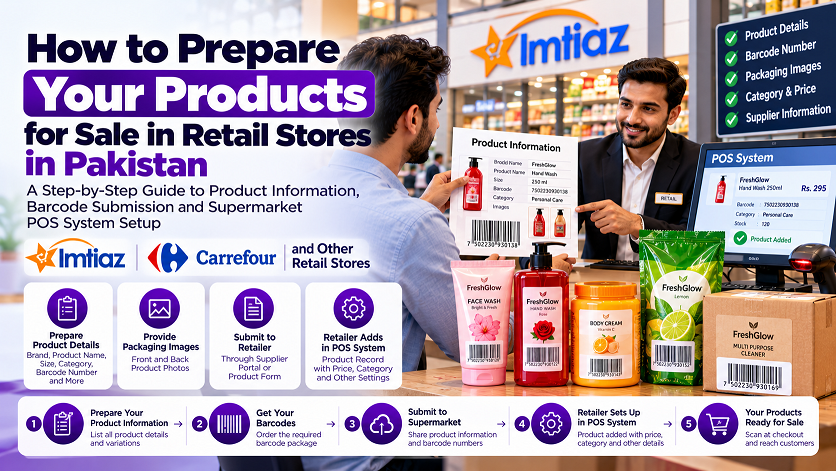
How to Prepare Your Products for Sale in Retail Stores in Pakistan
Planning to sell your own products in supermarkets, departmental stores, grocery chains, or other retail shops in Pakistan? Before approaching a retailer, it's important to understand how product information, barcodes, and store checkout systems work together.
Many new manufacturers and brand owners have similar questions:
How do I provide my product details to a supermarket?
Who enters my product into the store's POS system?
Does buying a barcode automatically register my product with a retailer?
What information should I prepare before contacting a supermarket?
How do I make sure my barcode scans correctly at checkout?
If you're launching a food brand, cosmetics line, cleaning products, clothing range, or another consumer product, this guide explains the process step by step.
1. What Happens After You Get a Barcode?
A barcode helps identify a product in a compatible retail or inventory system. However, purchasing a barcode does not automatically add your product to a supermarket's database.
Think of the process as three separate steps:
Step 1: Obtain a suitable product identifier
Choose a barcode solution that meets the requirements of your intended sales channels.
Step 2: Prepare your product information
Create a product information sheet containing the details that retailers may request during supplier onboarding.
Step 3: The retailer sets up your product
If the retailer approves your product for sale, its authorized team or designated supplier system will arrange the necessary product records and checkout configuration according to its procedures.
The exact process varies by retailer. Some may request information through a supplier portal, while others may use spreadsheets, product forms, or direct communication with their purchasing team.
2. What Is a Supermarket POS System?
POS stands for Point of Sale. It is the system used to process sales at checkout.
When a cashier scans a product, the POS system reads its barcode and looks for a matching product record. That record may contain information such as:
Product name
Product identifier or barcode number
Selling price
Product category
Tax or other applicable settings
Other information required by the retailer's system
If the barcode is correctly associated with the product record, the POS system can retrieve the relevant information.
Important: The barcode itself does not automatically contain the product name, price, ingredients, or full product description. The retailer's software must have the corresponding record.
3. Who Enters Your Product Information into the Supermarket's POS System?
This is one of the most common questions from new suppliers.
In many retail arrangements, the retailer or its authorized onboarding team is responsible for creating or approving the product record in its own system. In other arrangements, the supplier may submit the information through a portal or designated product-data process.
The exact responsibilities depend on the retailer.
For example, if you want to supply products to a supermarket, you may need to:
Contact the retailer's purchasing or supplier-onboarding team.
Complete the supplier application or product submission process.
Provide the requested product information and documentation.
Supply the barcode number and any required product images or packaging details.
Wait for the retailer to review and approve the product.
Follow the retailer's instructions for product setup and delivery.
Do not assume that you can directly access or edit a supermarket's POS database. Retailers generally control access to their internal systems.
4. What Product Information Should You Prepare?
Before contacting a supermarket, prepare a product information sheet. This makes it easier to answer the retailer's questions and submit accurate details.
The retailer may request some or all of the following:
| Product information | Example |
|---|---|
| Brand name | Your registered or trading brand name |
| Product name | Herbal Hand Wash |
| Barcode number | The number represented by your barcode |
| Net quantity | 250 ml |
| Product category | Personal care |
| Manufacturer or supplier | Your business details |
| Country of origin | As applicable to your product |
| Product images | Front and back packaging photos |
| Retail price | Your proposed selling price, if requested |
| Case or carton details | Units per carton and outer-pack information, if requested |
| Product documentation | Relevant licences, certificates, or declarations, where required |
This is an example checklist, not a universal supermarket form. Each retailer may require different fields, templates, or supporting documents.
Make sure the barcode number matches the barcode artwork printed on your actual product.
5. How to Prepare a Product Information Sheet
You can start with a simple spreadsheet containing one row for each distinct product variation.
For example:
| Field | Sample entry |
|---|---|
| Brand | FreshGlow |
| Product name | Aloe Vera Hand Wash |
| Pack size | 250 ml |
| Barcode number | Enter your actual barcode number |
| Product category | Personal care |
| Manufacturer | Enter your business details |
| Selling unit | One bottle |
| Product image | Link or file, if requested |
The example brand and product details above are illustrative. Use your own accurate information when preparing a real submission.
If you sell the same product in different sizes, create separate entries where each size is a distinct retail item. This helps prevent confusion when the retailer creates its product records.
If the retailer supplies its own spreadsheet or portal, use that format instead of assuming your own sheet will be accepted.
6. How Does the Barcode Connect to the Product Price?
A common misunderstanding is that the barcode automatically sets the product's price.
In a typical retail POS setup, the barcode identifies the product record, and the POS system retrieves the price stored in that record.
For example:
The cashier scans your product.
The system reads the barcode number.
The system finds the matching product record.
The registered selling price is displayed.
The sale proceeds according to the retailer's checkout process.
The retailer generally determines how its product records and selling prices are configured. You should not assume that the price you print on your packaging will automatically become the price in the supermarket's POS system.
Before supplying goods, agree on the commercial terms and confirm how the retailer handles pricing, promotions, and product updates.
7. What If the Supermarket Cannot Scan Your Barcode?
If a product fails to scan, several issues could be responsible.
For example:
The barcode artwork is blurred or distorted.
The barcode is too small or poorly printed.
The barcode has insufficient contrast.
The barcode number has not been associated with a product record in the retailer's system.
The retailer's system has incorrect or incomplete product information.
The product identifier or barcode format does not meet the retailer's requirements.
If scanning fails, ask the retailer to determine whether the problem is with the printed barcode, the product record, or its POS configuration.
Before printing thousands of labels, test a sample with a compatible scanner and ensure the artwork is clear. If possible, confirm that the barcode number is the one supplied during the retailer's product-registration process.
8. Can You Supply Products to Imtiaz, Carrefour, or Other Supermarkets?
If you plan to sell your products through well-known retail chains in Pakistan, contact the relevant retailer before making assumptions about its requirements.
Ask its purchasing or supplier-onboarding team:
How do I register as a supplier?
What product information must I submit?
Which barcode format and identifier requirements apply?
Does the retailer provide a product-data template or portal?
Who creates the product record in the retailer's system?
What documents and packaging specifications are required?
Requirements can differ between retailers and product categories. A barcode alone does not guarantee supplier approval, product listing, or acceptance for sale.
Confirm these details before ordering large quantities of packaging or committing to a launch date.
9. Does RetailBarcode.com Register Your Product in a Supermarket's POS?
No. Purchasing a barcode package from RetailBarcode.com does not automatically register your product with Imtiaz, Carrefour, or another retailer, and it does not give you access to their internal POS systems.
RetailBarcode.com provides barcode packages. Retailer onboarding, product approval, and POS product-record setup are separate processes controlled by the relevant retailer and its procedures.
Before purchasing a package for a specific retail chain, confirm that the barcode identifiers offered meet that retailer's requirements.
This distinction is important because it helps you understand what you need to arrange after obtaining your barcodes.
10. Your Checklist Before Approaching a Retailer
Use this checklist to prepare your business before contacting a supermarket.
Finalize your brand name and product names.
List every product and distinct pack-size variation.
Confirm the barcode and identifier requirements of your target retailer.
Prepare accurate barcode numbers and product details.
Photograph your actual product packaging.
Prepare relevant business and product documentation.
Ask the retailer how to submit product information.
Confirm who will create the product record in the retailer's POS system.
Test your printed barcode before mass-producing packaging.
Confirm commercial terms, delivery requirements, and product approval before launch.
Completing these steps can help you approach retailers with better preparation and fewer surprises.
Frequently Asked Questions
Does buying a barcode automatically add my product to a supermarket?
No. Buying a barcode does not automatically list your product or register it in a retailer's database. You must follow the retailer's supplier and product-onboarding procedures.
Who enters my product into the supermarket's POS system?
The retailer or its authorized team commonly handles its internal product records, although the exact process varies. Some retailers ask suppliers to submit product information through a designated portal or system.
Do I need to provide product details after buying a barcode?
Usually, you should prepare product details for the retailer's onboarding process. The exact information required depends on the retailer and product category.
Does the barcode contain the product price?
A typical retail barcode identifies a product; the POS system retrieves the associated price from its product record. The barcode does not automatically set the retailer's selling price.
Can I use the same barcode for different product sizes?
Different sizes sold as distinct retail products generally need separate identifiers. Confirm the requirements of your chosen identifier system and retailer before assigning barcodes.
Can RetailBarcode.com guarantee acceptance by a supermarket?
No. Retailer acceptance depends on its requirements and approval process. Confirm the suitability of the barcode package with your intended retailer before purchasing.
Where can I buy barcode packages online?
You can explore the available packages at RetailBarcode.com. If your main goal is to supply a specific supermarket, check its barcode requirements before ordering.
Final Thoughts
Preparing your products for supermarket sales involves more than obtaining a barcode. You also need accurate product information, suitable packaging, and a clear understanding of the retailer's supplier-onboarding process.
Start by contacting your target retailer, asking how product information is submitted, and confirming who handles POS product setup. Then choose a barcode solution that meets the retailer's requirements.
Planning to barcode your products? Visit RetailBarcode.com to explore the available packages and prepare for your next step toward retail sales.
Verify a Barcode
Check global registry details and official ownership status instantly.
Need Barcode Numbers?
Get retail-ready EAN & UPC codes with instant delivery and lifetime ownership.
View Packages Buy Barcode in Peshawar
  Buy Barcode in Larkana
  Buy Barcode in Hyderabad
  Pakistan
  Buy Barcode in Bahawalpur
  Buy Barcode in Islamabad