Do Supermarkets and Retail Stores Need Barcodes for Internal Use?
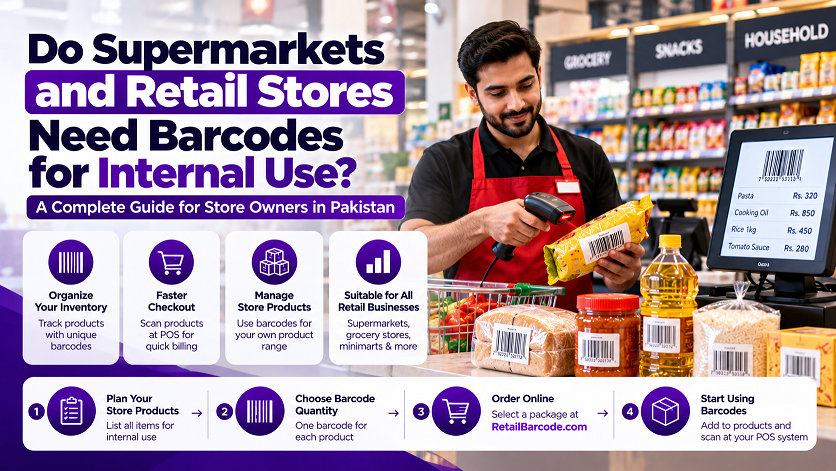
Do Supermarkets and Retail Stores Need Barcodes for Internal Use?
Do you own a supermarket, grocery store, minimart, departmental store, or retail business in Pakistan? If you want to manage your products more efficiently, speed up checkout, and organize your inventory, using barcodes can be a practical solution.
Many store owners assume barcodes are only necessary for products supplied by manufacturers. However, retailers can also use barcodes internally to identify products, manage stock, and connect items with their point-of-sale (POS) or inventory software.
Whether you run a small neighbourhood shop or a large retail store, this guide explains how internal barcodes work, when you may need them, and how to get started.
What Are Internal-Use Barcodes?
Internal-use barcodes are barcodes a business creates or assigns to identify products within its own operations.
For example, a grocery store might sell loose rice, locally sourced spices, bakery items, or products that arrive without a scannable barcode. The store can use its inventory or POS system to assign an internal product code and generate a corresponding barcode label.
When the barcode is scanned, the store's software can look up the product and retrieve its recorded price or other information.
The important point is that a barcode does not automatically contain the product's price or details. Your POS or inventory system must have the corresponding product record.
Why Do Retail Stores Use Barcodes?
Barcodes can help retail businesses manage everyday operations more efficiently.
1. Faster Checkout
Instead of searching for every product manually, staff can scan a barcode to retrieve the associated product record and price from the POS system.
2. Better Inventory Management
Barcodes can help identify products during stock receiving, sales, stock counts, and inventory adjustments, depending on the software being used.
3. Easier Product Identification
If your store sells hundreds or thousands of items, assigning identifiers can make it easier to distinguish products and maintain organized records.
4. Support for Products Without Barcodes
Some products, such as locally sourced goods, store-packed items, or certain loose products, may not arrive with a suitable retail barcode. Your store may be able to assign internal codes to these items.
5. More Organized Store Operations
A consistent barcode system can help connect product labels, stock records, and checkout operations, reducing the need to search manually for items.
Which Businesses Can Benefit from Internal Barcodes?
Internal barcode systems may be useful for many types of retail businesses in Pakistan, including:
Supermarkets and departmental stores
Grocery stores and minimarts
General stores
Cosmetics and beauty shops
Clothing and garment stores
Electronics and accessories shops
Hardware and home improvement stores
Warehouses and stockrooms
Retailers selling their own private-label products
The best setup depends on your product range, software, and daily workflow.
Do You Need a Separate Barcode for Every Product?
For inventory and POS purposes, each distinct product record generally needs a way to be identified. If you use barcodes, you must make sure each barcode maps to the correct record in your system.
For example, a grocery store might maintain these records:
| Product | Example internal code |
|---|---|
| Basmati rice, 1 kg | STORE0001 |
| Basmati rice, 5 kg | STORE0002 |
| Cooking oil, 1 litre | STORE0003 |
| Cooking oil, 5 litres | STORE0004 |
| Laundry detergent, 1 kg | STORE0005 |
These are illustrative internal codes, not actual globally assigned product identifiers.
Different sizes or variations often need separate product records when the store tracks them separately. The barcode system should reflect how your POS software manages these items.
Can You Use Barcodes for Products That Already Have Barcodes?
Yes, but you should first decide whether you need an additional internal identifier.
If a packaged product already has a barcode that your POS system recognizes, you may be able to use that barcode directly. Your software simply needs to associate it with the correct product record.
If you create a separate internal barcode for the same item, make sure your system and staff understand which identifier to use. Duplicate or conflicting records can cause checkout and inventory problems.
For products intended for sale through other retailers, do not assume that an internal barcode is suitable as the product's standard retail identifier. Internal codes and globally assigned retail product identifiers serve different purposes.
Can You Use RetailBarcode.com Barcodes for Internal Store Use?
If you are opening a supermarket or retail store, you may be considering buying barcode packages to label your own products or manage your inventory.
Whether a package is suitable depends on how you intend to use it.
For internal inventory and checkout, first check whether your POS software lets you create your own product codes or requires a particular barcode format. Some systems support custom internal codes, while others have specific requirements.
Before ordering from RetailBarcode.com, consider these questions:
Does your POS system support the barcode format you intend to use?
Will your software let you assign the barcode to each product record?
Are you labelling products only for your own store, or will you supply them to other retailers?
Do you need barcodes for existing products, store-packed items, or your own branded products?
If you plan to sell products to other supermarkets or distributors, ask those businesses what type of product identifier they require. A barcode suitable for your own store is not automatically accepted as a standard retail identifier elsewhere.
How to Start Using Barcodes in Your Store
Follow these steps to plan a simple barcode system.
Step 1: Make a product list
Prepare a list of all products you sell, including different sizes, weights, colours, and variations that need separate records.
Step 2: Check your POS software
Ask your software provider which barcode formats and code lengths are supported. Confirm whether the software can generate internal codes and print barcode labels.
Step 3: Decide which products need barcodes
Identify products that already have usable barcodes and those that need internal identifiers.
Step 4: Choose a suitable barcode approach
For internal-only products, your POS system may be able to generate unique codes and matching labels. If you are considering an external barcode package, verify that it meets your system's requirements and intended use.
Step 5: Create product records
Enter each product's name, code, price, and other required information into your POS or inventory software.
Step 6: Print and test labels
Print sample labels and scan them using your actual equipment. Confirm that each barcode retrieves the correct product record.
Step 7: Train your staff
Show employees how to scan products, handle items without labels, and update inventory records correctly.
Should You Buy Barcode Packages or Generate Your Own Internal Codes?
This depends on your business requirements.
If you only need to identify products within your own store, your POS software may already offer an internal barcode-generation feature. This can be a straightforward option because the codes are managed directly within your system.
If you need a barcode package for a particular purpose, compare the available options with your software's requirements before purchasing.
If you manufacture your own products or intend to supply them to other retailers, confirm the identifier requirements of those sales channels before deciding which barcode solution to use.
There is no single barcode approach that is ideal for every store. The right choice depends on whether you need internal inventory identification, standard retail product identification, or both.
Get Started with RetailBarcode.com
Planning to organize your store's products with barcodes?
RetailBarcode.com offers barcode packages that you can explore for your business requirements. Before ordering, confirm that the package and identifiers are suitable for your intended use and compatible with your POS or inventory system.
Visit RetailBarcode.com to review the available packages.
If you are unsure which option fits your store, start by identifying your POS software, the products you want to label, and whether the barcodes will be used only internally or also for sales through other retailers.
Frequently Asked Questions
Can a small grocery store use barcodes for internal inventory?
Yes. A small grocery store can use barcodes to identify products and support inventory or checkout operations, provided its software supports the chosen barcode system.
Do I need barcodes for every product in my shop?
Not necessarily. You need a reliable way to identify each product record you manage. Barcodes can be used for products where scanning is useful, while your POS software determines how items are recorded.
Can I create my own barcodes for internal use?
Many POS and inventory systems allow businesses to generate internal product codes and corresponding barcode labels. Check your software's documentation before choosing a code format.
Can I use internal barcodes to sell products to other supermarkets?
Not automatically. Internal codes may work within your own store but may not meet another retailer's product-identification requirements. Confirm those requirements before supplying products.
Will any barcode scanner work with my POS system?
Not necessarily. Scanner compatibility, barcode format, connection type, and software configuration can all matter. Test your equipment with your POS system before rolling out labels across the store.
Where can I buy barcode packages in Pakistan?
You can explore available options at RetailBarcode.com. Check your intended use and software requirements before placing an order.
Final Thoughts
Barcodes are not just for manufacturers. Supermarkets, grocery stores, minimarts, and other retailers can also use barcode systems to organize their products and support checkout and inventory operations.
If you are opening a new store or improving an existing one, first check what your POS software supports and decide whether you need internal product codes, standard retail identifiers, or both.
Then choose a barcode solution that fits your requirements.
Verify a Barcode
Check global registry details and official ownership status instantly.
Need Barcode Numbers?
Get retail-ready EAN & UPC codes with instant delivery and lifetime ownership.
View Packages Buy Barcode in Faisalabad
  Buy Barcode in Larkana
  Buy Barcode in Quetta
  Buy Barcode in Lahore
  Buy Barcode in Gujranwala
  Buy Barcode in Sheikhupura